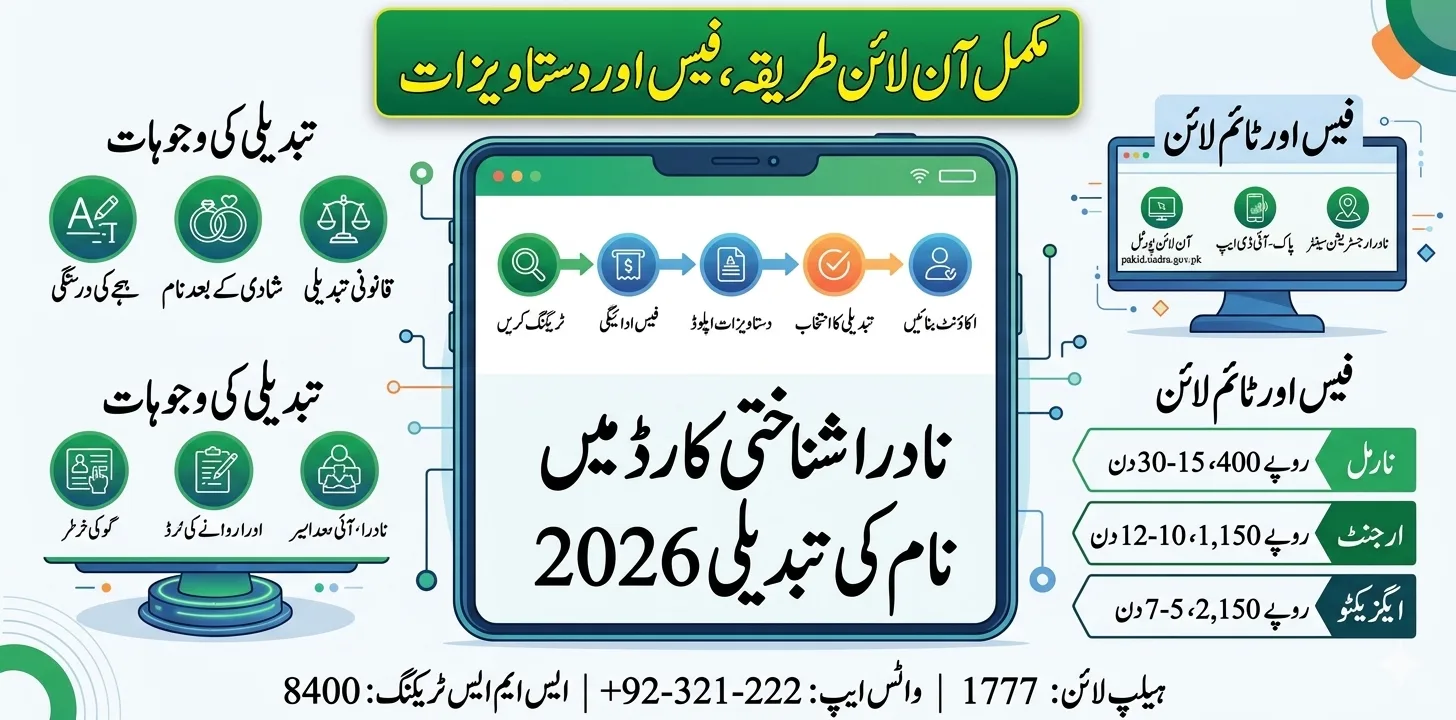
The NADRA identity card name change process in 2026 allows every Pakistani citizen to officially correct or update their name on their CNIC or Smart CNIC , whether due to a spelling mistake, marriage, divorce, legal name change, or religious/cultural adjustment , through both a fully digital online process at pak id.nadra.gov.pk and an in-person visit to any NADRA Registration Center (NRC).
Even a minor name mismatch can cause verification problems in passports, bank accounts, SIM registrations, property records, and government services. The entire name change process takes just 7 to 15 working days depending on your chosen service category , Normal, Urgent, or Executive , with fees starting from as low as Rs. 400 for modification. This complete 2026 guide covers every reason, every method, all required documents, the exact fee structure, and how to track your application in real time.
NADRA Name Change 2026 – Quick Reference
| Detail | Information |
| Official Online Portal | pakid.nadra.gov.pk (Pak-ID / Pak-Identity) |
| NADRA Website | nadra.gov.pk |
| NADRA Helpline | 1777 (Toll-Free Nationwide) |
| WhatsApp NADRA | +92-321-222-5353 |
| SMS Status Check | Send CNIC to 8400 |
| Pak-ID App | Available on Android & iOS |
| CNIC Modification Fee (Normal) | Rs. 400 – Rs. 750 |
| CNIC Modification Fee (Urgent) | Rs. 1,150 – Rs. 1,500 |
| CNIC Modification Fee (Executive) | Rs. 2,150 – Rs. 2,500 |
| Standard Processing Time | 15–30 days (Normal) |
| Urgent Processing Time | 10–12 days |
| Executive Processing Time | 5–7 days |
| Online Application | Yes , fully digital via Pak-ID |
| Delivery | Courier to registered address (Rs. 165 within Pakistan) |
| Overseas Pakistanis | Apply via Pak-ID portal (NICOP) , international delivery |
Why You Need to Change Your Name on NADRA CNIC – 6 Common Reasons
Changing your name on a Computerized National Identity Card (CNIC) in Pakistan is a process managed by the National Database and Registration Authority. Many people need to update their name due to marriage, correction of spelling mistakes, legal name changes, or family record updates.
Here is the complete list of valid reasons NADRA accepts for a name change:
| Reason | Common Examples | Documents Needed |
| Spelling Mistake | “Ahemad” instead of “Ahmad”; “Fatiema” vs “Fatima” | Matric certificate / birth certificate with correct spelling |
| Marriage (Surname Change) | Woman adding or removing husband’s surname | Nikah Nama (Marriage Certificate) |
| Divorce (Reverting Name) | Reverting to maiden name after divorce | Divorce Certificate (Khula/Talaq Nama) |
| Legal Name Change | Court-ordered name change | Court affidavit + newspaper publication |
| Religious/Cultural Adjustment | Adding Islamic prefix; aligning with family records | Affidavit + supporting ID documents |
| Father’s Name Correction | Wrong father’s name in NADRA database | B-Form + father’s CNIC + family records |
Even a minor name mismatch can cause verification problems in passports, bank accounts, or educational records. Keeping your NADRA ID card information accurate ensures smooth verification in all official transactions.
NADRA Name Change Fee Structure 2026 – Official Rates
Modifying the data printed on your card requires the issuance of a new physical card, so standard printing fees apply. Here is the complete, verified fee structure for every service category:
Standard CNIC / Smart CNIC Modification Fees
| Service Category | Processing Time | Fee (PKR) | Best For |
| Normal | 15–30 days | Rs. 400 – Rs. 750 | Non-urgent changes; budget-friendly |
| Urgent | 10–12 days | Rs. 1,150 – Rs. 1,500 | Needed within 2 weeks |
| Executive | 5–7 days | Rs. 2,150 – Rs. 2,500 | Urgent , passport, visa, bank applications |
Additional Charges
| Charge | Fee |
| Delivery within Pakistan | Rs. 165 per card |
| Non-printable field update (chip data only , no new card) | Rs. 100 via NRC / $5 via Pak-ID App |
| Overseas NICOP name change | Higher , varies by delivery country |
If you need to update information that is stored in the chip but not printed on the face of the card (such as updating a mobile number or certain biometric details that don’t alter the visual card), the fee is significantly lower.
Simple Spelling Correction – Reduced Process
If your issue is only a spelling mistake, NADRA allows you to correct it through the Pak ID system with minimal documentation. Usually, you only need to provide a Matriculation certificate showing the correct spelling. This helps ensure that your CNIC name matches other official records without requiring a full name change process.
Documents Required for NADRA Name Change 2026
The documents required vary depending on the reason for the name change. Before applying for a CNIC name correction or modification, you should prepare the required documents. NADRA may request different documents depending on the reason for the change.
| Reason for Change | Required Documents |
| Spelling Correction | Original CNIC + Matric/SSC Certificate + Birth Certificate |
| Marriage (New Surname) | Original CNIC + Nikah Nama (NADRA-registered) + husband’s CNIC |
| Divorce (Reverting Name) | Original CNIC + Divorce Certificate (Khula/Talaq Nama) |
| Legal Name Change | Original CNIC + Court Order + Affidavit + Newspaper Advertisement |
| Father’s Name Correction | CNIC + Father’s CNIC + B-Form (CRC) + FRC |
| Religious/Cultural Adjustment | CNIC + Affidavit on stamp paper + supporting family documents |
| All Cases (Universal) | 2 passport-size photos + Active mobile number registered in own CNIC |
Make sure all documents reflect the same name format. Use the same name format across all official IDs , passport, CNIC, and educational certificates. This prevents rejection or mismatched records during verification.
Method 1 – Apply for NADRA Name Change Online (Pak-ID Portal)
NADRA’s Pak-Identity system has eliminated unnecessary office visits for most services, empowering citizens with secure digital access. Here is the complete online application process:
Step 1 – Access the Pak-ID Portal
- Visit pakid.nadra.gov.pk on your mobile or computer
- Download the Pak-ID app from Play Store or App Store for a smoother experience
Step 2 – Create or Login to Your Account
- New user: Register using your CNIC, mobile number, and email
- Existing user: Login with credentials and verify via OTP
Step 3 – Select “CNIC Modification” Service
- Click “Modify CNIC”
- Select the specific field you want to change , “Name” or “Name Correction”
Step 4 – Fill Modification Details
- Enter your corrected name exactly as it appears on your supporting documents
- Double-check spelling , once submitted, corrections require a new application
Step 5 – Upload Required Documents
- Scan and upload all relevant documents in clear, readable format (JPG or PDF)
- Ensure all 4 sides of original documents are visible
Step 6 – Select Service Category
- Choose Normal (Rs. 400–750), Urgent (Rs. 1,150–1,500), or Executive (Rs. 2,150–2,500)
- Review your selection before payment
Step 7 – Pay Online
- Pay securely via credit/debit card, JazzCash, Easypaisa, or bank transfer through the Pak-ID portal
- Save your payment receipt and application tracking ID
Step 8 – Biometric Verification (if required)
- Your photograph, signature, and fingerprints will be captured again to complete the process.
- Minor spelling corrections may not require biometric re-enrollment , the portal notifies you if needed
Step 9 – Track & Receive
- Track your application at pakid.nadra.gov.pk or SMS CNIC to 8400
- Once approved, the CNIC will be delivered to your registered address.
Method 2 – In-Person at NADRA Registration Center (NRC)
If you prefer an in-person process, visit your nearest NADRA Registration Center (NRC). Request a Name Change Form from the counter. Fill it carefully with your updated details. Provide biometric verification and submit your supporting documents. Pay the relevant processing fee.
Complete In-Person Steps:
- Locate your nearest NRC , use nadra.gov.pk/nadra-offices to find the closest center
- Visit the NRC with original documents and photocopies
- Take a numbered token from the reception counter
- Request a “CNIC Modification Form” at the data entry window
- Fill the form accurately , name, CNIC number, reason for change
- Submit original documents along with the form
- Biometric capture , thumb impression, photograph, and signature re-recorded
- Pay the fee at the payment counter , get receipt with tracking ID
- Track via SMS , send your CNIC to 8400 for status updates
- Collect or receive , pick up at NRC or receive by courier (Rs. 165)
For complex legal name changes requiring court affidavits, newspaper publications, or disputed records, the in-person method is strongly recommended as staff can guide you through additional verification requirements.
Processing Time Comparison – Which Category to Choose?
The processing time depends on the service category selected. Normal processing usually takes around 15 to 20 days. Urgent processing may take approximately 10 days. Executive processing can deliver the CNIC within 5 to 7 days.
| Your Situation | Recommended Category | Why |
| No immediate urgency | Normal (Rs. 400–750) | Most affordable , 30-day timeline acceptable |
| Need CNIC within 2 weeks | Urgent (Rs. 1,150–1,500) | Passport, bank account, job application deadline |
| Need CNIC this week | Executive (Rs. 2,150–2,500) | Visa interview, property deal, urgent travel |
| Only chip data, not card face | Non-printable update (Rs. 100) | Mobile number, address chip update , no new card issued |
If you have plenty of time before your current card expires, the Normal category saves you a significant amount of money , Rs. 1,750 compared to the Executive rate. However, the convenience of the Executive service is undeniable when time is of the essence.
How to Track Your NADRA Name Change Application Status
After submitting your application, track in real time through three methods:
| Method | How | What You See |
| Pak-ID Portal | pakid.nadra.gov.pk → Login → “My Applications” | Stage-wise progress: Received → Processing → Printing → Dispatched |
| SMS Tracking | Send your 13-digit CNIC to 8400 | Instant status reply: current stage and expected date |
| NADRA Helpline | Call 1777 (toll-free) | Human agent confirms status and provides ETA |
| Pak-ID App | Push notification updates | Real-time alerts at each stage |
You can track it using your Pak ID account or by sending your CNIC number to 8400 via SMS.
Legal Name Change – The Full Procedure (Court Affidavit)
A complete legal name change in Pakistan requires more than just visiting NADRA. Here is the full process:
| Step | Action | Where |
| 1. Prepare Affidavit | Draft a sworn affidavit stating old name, new name, and reason | Notary / Oath Commissioner |
| 2. Get Affidavit Attested | Rs. 200–500 stamp paper + notary signature | Lawyer or Notary |
| 3. Publish in Newspaper | Place advertisement in 2 national newspapers declaring name change | Dawn, Jang, Express, The Nation |
| 4. Gazette Notification | Some cases require gazettement , apply at Printing Corporation of Pakistan | Islamabad (optional but recommended) |
| 5. Apply at NADRA | Visit NRC with affidavit + newspaper cuttings + court order (if applicable) | Any NRC |
| 6. Pay Modification Fee | Rs. 400–Rs. 2,500 based on urgency | NADRA counter |
| 7. Receive Updated CNIC | Delivered within 5–30 days | Courier or NRC collection |
Overseas Pakistani Name Change – NICOP Process
Overseas Pakistanis holding a NICOP (National Identity Card for Overseas Pakistanis) can also apply for name changes or spelling corrections through the Pak ID portal. Applicants can upload scanned documents, pay fees online, and receive their updated NICOP by mail at their foreign address. This feature helps expatriates maintain accurate Pakistani identity records without returning to Pakistan.
Key differences for overseas applicants:
| Feature | Details |
| Application Method | Pak-ID portal , no embassy visit for minor corrections |
| Fee Currency | USD (NICOP Zone A: North America, Europe, Middle East, Far East) |
| Biometric Verification | May require visit to Pakistani Embassy or NADRA partner center |
| Delivery | International courier , varies by country |
| Processing | Same 3 categories: Normal, Urgent, Executive , longer due to international logistics |
What Happens If Your Name Change Application Is Rejected?
If your NADRA name change application is rejected, here are the common reasons and immediate actions:
| Rejection Reason | Solution |
| Documents unclear or expired | Re-upload clear, valid scanned documents |
| Name inconsistency across documents | Align name on Matric certificate, birth record, and supporting papers |
| Affidavit not properly attested | Get notarized on correct denomination stamp paper |
| Newspaper publication missing | Complete newspaper notice and resubmit |
| Biometric mismatch | Visit NADRA for fresh biometric enrollment |
| NADRA records show dispute | Visit NRC in person , complex cases require human review |
Most minor updates do not require a visit. You can reapply after correcting errors or visit a NADRA center if required.
Pro Tips – Ensure Your Name Change Goes Through First Time
Double-check your name spelling before submitting. Make sure all documents reflect the same name format. Keep your Pak ID login credentials safe for future updates. Use the same name format across all official IDs (passport, CNIC, and educational certificates). These steps help avoid unnecessary delays, document rejections, or mismatched records during verification.
Additional expert tips for 2026:
- ✅ Match name format exactly , if your Matric certificate says “Muhammad Ahmad Khan”, don’t enter “M. A. Khan” on the form
- ✅ Use Executive service if you have an upcoming passport application, visa interview, or property transaction within 2 weeks
- ✅ Update all documents together , after CNIC, immediately update passport, SIM, bank, and educational records to avoid cascading mismatches
- ✅ Keep original documents safe , NADRA does not return submitted originals; submit notarized copies for legal documents
- ✅ Check processing stage via SMS 8400 every 3 days during the processing period
- ❌ Never pay any agent to “speed up” your NADRA name change , the process is fully transparent and self-service
- ❌ Do not submit multiple applications , duplicate applications are automatically cancelled
Frequently Asked Questions (FAQs)
Q: How do I change my name on my NADRA CNIC in 2026? NADRA’s Pak-ID online portal allows citizens to apply from home without visiting an office. Visit pakid.nadra.gov.pk, login with your CNIC, select “CNIC Modification,” choose “Name Change,” upload supporting documents, pay the fee, and track via SMS to 8400. Alternatively, visit any NADRA Registration Center (NRC) in person.
Q: What is the NADRA name change fee in 2026? CNIC modification costs PKR 400 under the normal category. The urgent processing fee is PKR 1,150. The executive fee is PKR 2,150 for all major CNIC services. Delivery time ranges from 3 to 30 working days, depending on the selected category.
Q: How long does the NADRA name change process take? Usually, it takes 7 to 15 working days, depending on verification and the chosen processing type (Normal, Urgent, or Executive). Normal takes 15–30 days; Urgent 10–12 days; Executive 5–7 days.
Q: Can I change my name on CNIC online without visiting NADRA? Yes, most CNIC updates can be completed online from home in 2026. Normal applications take up to 30 days; executive service can be completed in 3–5 days. However, major changes like complete identity disputes may still require biometric verification at an NRC.
Q: What documents do I need to change my name after marriage? You need your original CNIC, NADRA-registered Nikah Nama (marriage certificate), and husband’s CNIC. Submit these at any NRC or upload via the Pak-ID portal. The process follows standard modification fees.
Q: How do I track my NADRA name change application? You can track it using your Pak ID account or by sending your CNIC number to 8400 via SMS. The Pak-ID app also provides real-time push notifications at each processing stage.
Q: Can overseas Pakistanis change their name on NICOP from abroad? Overseas Pakistanis holding a NICOP can also apply for name changes or spelling corrections through the Pak ID portal. Applicants can upload scanned documents, pay fees online, and receive their updated NICOP by mail at their foreign address.
Q: Is there a fee for correcting just a spelling mistake vs a full name change? If your issue is only a spelling mistake, NADRA allows a faster correction process. Usually, only a matric certificate or birth record is required for verification. This option reduces paperwork and processing time. The same modification fee applies (Rs. 400–2,500 by category), but documentation requirements are minimal.
Final Thoughts
The NADRA identity card name change process in 2026 is faster, more transparent, and more accessible than ever before , the NADRA Identity Card Name Change process has become faster and more efficient thanks to the Pak ID online system. Whether it’s a simple spelling correction or a full legal name update, NADRA ensures a secure, transparent, and user-friendly process for all citizens. Whether you choose the fully digital Pak-ID portal at pakid.nadra.gov.pk or prefer walking into your nearest NRC, the process is straightforward. Start with a simple spelling fix in under 10 minutes online, or navigate a complete legal name change with the right affidavit and newspaper publication. Always keep your name consistent across all documents , CNIC, passport, SIM, bank, and educational records , to ensure smooth verification across Pakistan’s entire identity ecosystem.
Official Resources:
- Pak-ID Portal: pakid.nadra.gov.pk
- NADRA Website: nadra.gov.pk
- NADRA Helpline: 1777 (Toll-Free)
- WhatsApp: +92-321-222-5353
- SMS Tracking: Send CNIC to 8400
- Pak-ID App: Available on Android & iOS